Guide
Make Videos with Claude: Which Tool for Which Effect, Tested
Just use Claude Code with HyperFrames. We had Claude render 27 videos with three tools: every one met the brief, at $0.36 to $1.51 each. Which tool fits which effect.
For freelancers and small teams who want Claude to make videos
Just use HyperFrames.
Tell Claude Code to build it with HyperFrames. All 27 of our test videos met the brief on the first unattended run, whichever renderer we named. HyperFrames is the one with official skills and no license fee at any team size.
- Price
- Free
Open sourceApache-2.0★ 70.4klast commit Oct 23, 2026View on GitHub
Visit HyperFrames Opens HyperFrames’s site. Free trial or plan where available.
In this guide
- The short answer
- Can Claude make videos? Three ways
- How agent-built video works
- Our test: 27 videos, three renderers
- HyperFrames, Remotion or no framework
- Which tool for which effect
- The workflow that works
- What it costs
- Voice, music and captions
- Limits and honest risks
- Dead ends as of October 2026
- Questions people ask
- Sources
Claude has no video model. It still makes videos: it writes code that draws every frame, and a renderer turns those frames into an MP4. Since Claude Opus 5.5, that works well enough to ship promos, explainers and short animations without editing software. We tested it on 22 October 2026. Claude Code got three briefs and three different renderers, three runs each, with nobody watching. All 27 videos met the brief. This guide shows which tool to name for which effect, what it costs, and where the approach stops. All raw data is public [1].
- The pick: Claude Code with HyperFrames. It’s free and open source, ships official agent skills, and charges no license fee however big your team gets.
- Our test: 27 of 27 videos came out exactly to spec (length, 1080p, 30 fps) on the first unattended run. They cost $0.36 to $1.51 each at API prices and took 3 to 9 minutes.
- The renderer barely mattered: HyperFrames, Remotion and a plain Canvas page all delivered. HyperFrames cost about 15 cents more per clip, because its skills make Claude check its work before rendering.
- Pick by effect: Manim for maths, Lemo-Opuscar for a specific film style, Three.js for 3D, a video model for realistic footage. The full table is below.
- The limits: no realistic people without a video model, and Claude can’t hear the audio. “One prompt” demos usually hide several review rounds.
The short answer
Just use Claude Code with HyperFrames:
- Get Claude Code. It comes with every paid Claude plan, starting at Pro: $20 a month, or $17 billed yearly [3].
- Install HyperFrames’ skills (2 minutes). In Claude Code, run the two commands below. HyperFrames needs Node.js 22+ and FFmpeg [2]. If you don’t have them, ask Claude Code to install them.
- Write a brief. List the format, the length, what happens in each second, every word on screen and your colours. Our template is under “The workflow that works”.
- Let it run. In our test a 10-to-20-second clip took 3 to 9 minutes, unattended [1].
- Look at the frames before you publish. Check for typos, text that disappears too fast, and anything that overlaps.
claude plugin marketplace add heygen-com/hyperframes
claude plugin install hyperframes@hyperframes
Then ask: “Make a 15-second launch video for … using HyperFrames”, followed by your brief.
Use Remotion instead if your product is already a React app and your company has three people or fewer, or if you pay for its license. Use Claude Motion if you’re on a Team plan and don’t want a terminal. Use a video model (Seedance, Luma, Higgsfield) when you need realistic footage or people. Claude can direct those models, but it can’t draw that kind of picture itself.
Free and open source (Apache-2.0). Works with Claude Code, Codex, Cursor and Gemini CLI.
Can Claude make videos? Three ways
1. Claude Motion, inside claude.ai. Since 8 October 2026, Anthropic has offered Claude Motion as a beta [5]. You describe the animation, Claude writes it as code that “animates the text, charts, shapes, and images” in your prompt, and you export an MP4. It is on by default on Team plans and off on Enterprise until an owner enables it. It isn’t available on Free, Pro or Max. Anthropic is explicit about the limit: Claude Motion “doesn’t use a video generation model, so it doesn’t create realistic footage or people”. Longer animations use more of your plan’s usage [4]. It’s the right tool for a 30-second chart explainer when your company is on a Team plan.
2. Claude Code plus a renderer. This is what this guide is about, and it works on every paid plan. Claude Code writes the animation, uses a renderer such as HyperFrames or Remotion, renders the MP4 on your computer, looks at its own frames and fixes what it sees. You get the finished file and the source code. Change a word or a number and it renders again.
3. Claude directs a video model. For realistic footage, people or camera moves through real-looking places, you need a generative model such as Seedance, Kling, Veo or Luma. Claude Code can write the shot list, call the model through an API or an aggregator like Higgsfield, and cut the results together. You pay per second of generated video: Higgsfield lists Seedance 2.5 from $0.206 per second [6]. Claude plans the shots; the model makes the pixels.
Most useful videos for a freelancer or small team, such as promos, explainers, chart videos and social clips, need route 2, not route 3.
How agent-built video works
Every frame is a web page. The agent writes a page that can draw any moment of the film on request. Headless Chrome opens it, steps through the timeline frame by frame and saves each picture, and FFmpeg encodes the result. Because each frame is a function of time, the same input always gives the same video. HyperFrames’ README describes exactly this [2].
The approach is older than any framework. The best-known creator projects from the Opus 5.5 wave all build this pipeline themselves, without HyperFrames or Remotion:
- Lemo-Opuscar is a library of 59 film styles made in code, from watercolour to ukiyo-e [8].
- mg-styles-15 has fifteen 10-second motion-design films, with the full prompts and source [9].
- mexicat’s P(doom) music video has word-synced lyrics in an engraving look [10].
- ClaudeAnimationBase is a starter kit for hand-painted characters [11].
A study of 168 closely reviewed Claude 5.5 video cases found code-drawn 2D to be the most common production route (52 cases). Only 10 used an external video model [7].
So the framework is not what makes it possible. It saves the agent from rebuilding the pipeline, and gives it a preview, checks and rules. Our test measured whether that shows in the result.
Our test: 27 videos, three renderers
Setup. We wrote three briefs:
- a 10-second kinetic-type launch promo for a fictional invoicing app
- a 20-second explainer on compound interest, with a line chart and exact numbers
- a 10-second hand-drawn animation of a coffee cup that wakes up and waves
Each brief went to Claude Code (version 2.1.308, Claude Opus 5.5) through three routes:
- HyperFrames, with its official skills
- Remotion, with its official agent skills [12]
- a plain Canvas page, with no framework and no skills, captured with headless Chromium
That makes three runs per combination, 27 in total. Every run started in a fresh container with only an API key: no account login, no memory, no human input after the brief. Before each run we asked Claude what it knew about the user. Not one run named anything personal. Six mentioned the container’s own user name.
How we measured. With rules, not opinions. ffprobe checked length, resolution, frame rate and codec. We confirmed from each run’s source code that it had really used its route’s framework. OCR searched for the brief’s exact text at fixed moments, and we checked every OCR miss by eye. A freeze detector looked for stills longer than one second. For the promo we also checked that nothing left the 5% safe margin. We didn’t rate taste. Every brief, run, contact sheet and preview video is in the dataset [1].
| Brief | HyperFrames | Remotion | Plain Canvas |
|---|---|---|---|
| Promo, 10 s (watch) | $0.64 · 3.5 min | $0.43 · 3.4 min | $0.41 · 2.8 min |
| Explainer, 20 s (watch) | $0.47 · 2.9 min | $0.43 · 3.4 min | $0.47 · 3.0 min |
| Character, 10 s (watch) | $1.24 · 7.3 min | $0.99 · 6.3 min | $1.05 · 7.2 min |
| All briefs | $0.78 · 4.6 min · 20 turns | $0.62 · 4.4 min · 19 turns | $0.64 · 4.3 min · 15 turns |
| Met the format spec | 9 of 9 | 9 of 9 | 9 of 9 |
Mean of three runs, API prices, Claude Opus 5.5. The “watch” links open the HyperFrames take. The other routes’ previews are in the dataset.
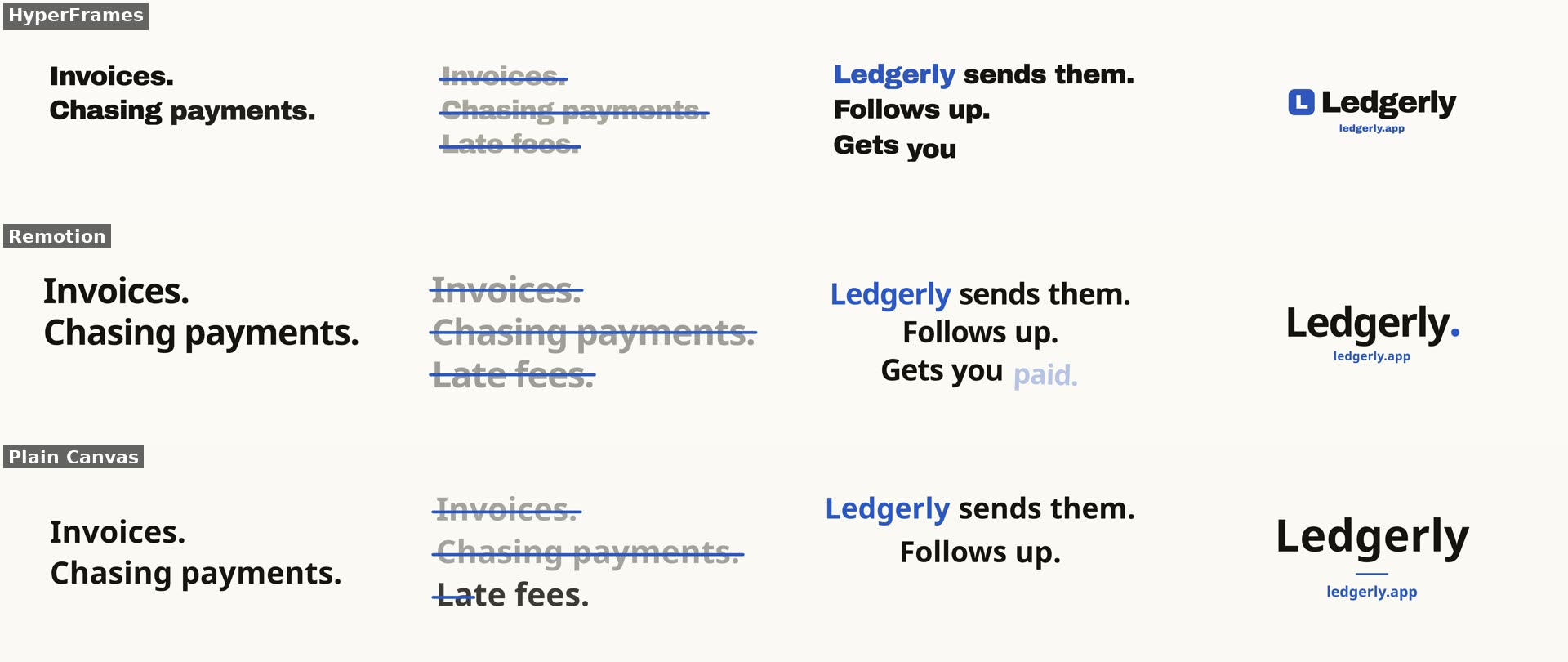
The promo, first run of each route, at 1.5, 4.5, 7 and 9.5 seconds.
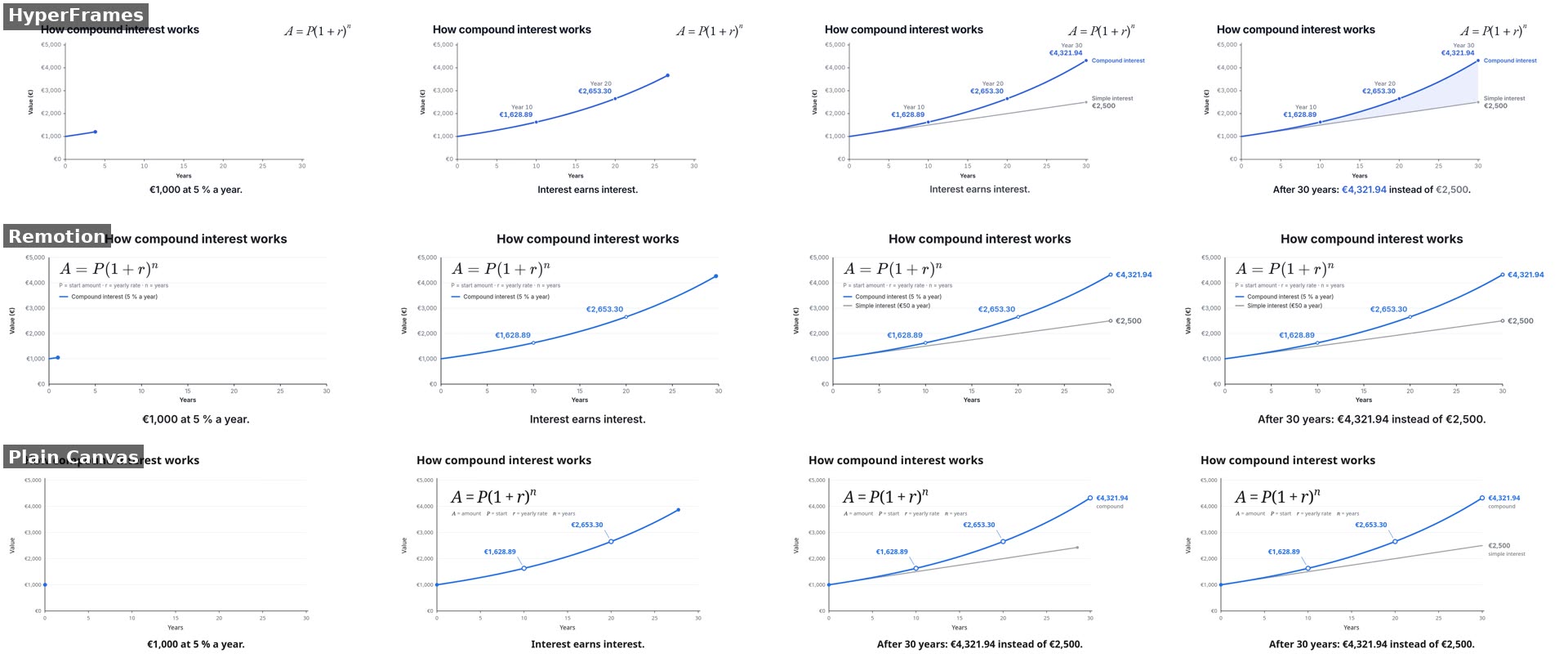
The explainer at 3, 8, 13 and 19.5 seconds. All nine runs show every number exactly as given.
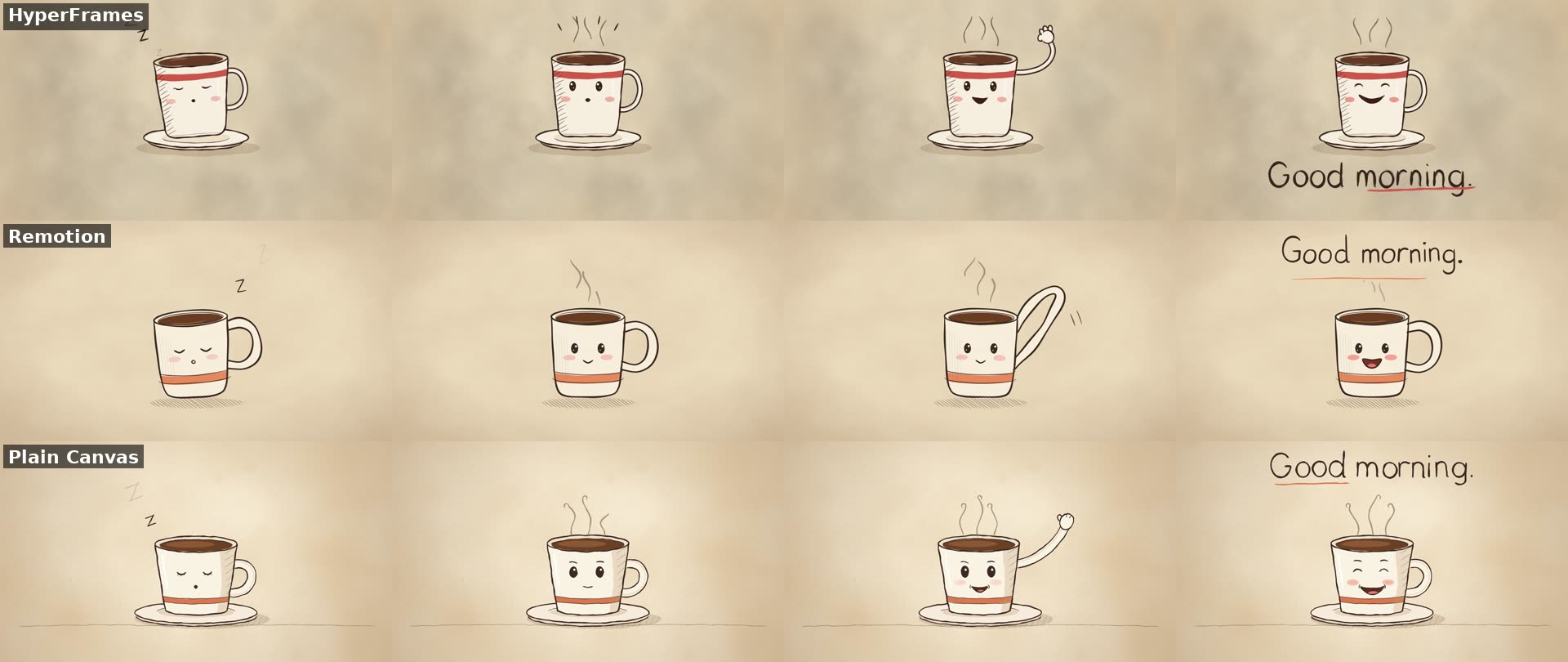
The character brief at 1.5, 4.5, 7 and 9.7 seconds. Three routes, three different cups, every beat present.
What we saw:
- Every run delivered. All 27 videos had the exact length (10.0 or 20.0 seconds), 1920×1080, 30 fps and H.264, on the first attempt. No run crashed or gave up, and none needed a second prompt.
- The numbers were right. All nine explainers showed €1,628.89, €2,653.30, €4,321.94 and €2,500 exactly as briefed. The brief asked for a properly typeset formula, and every run rendered one.
- The promo rules held. In all nine promos the text stayed inside the safe margin. No frame stood still for more than a second before the end card.
- The renderer didn’t decide the outcome. Remotion and the plain page cost about the same. HyperFrames cost about 15 cents more per clip and took more turns: its skills have the agent lint, preview and check the composition before rendering [2]. For a 10-to-20-second piece, that’s cheap insurance, but it didn’t measurably change these results.
- Drawing costs more than type. The hand-drawn character cost about twice as much as the promo and took twice as long. Each route took its own approach: different cups, different handwriting, different waves.
Limits. One model, one day, three short briefs, no audio. Our checks prove that the video meets a spec and shows the right text. They don’t prove that anyone would want to watch it. Nobody rated the videos, and on harder briefs a framework’s checks may matter more than they did here. The agent writes different code on every run, so a rerun won’t match these numbers exactly.
HyperFrames, Remotion or no framework
Since quality didn’t separate them, choose on license and workflow:
| HyperFrames | Remotion | Plain Canvas page | |
|---|---|---|---|
| License | Apache-2.0, “no per-render fees or commercial-use thresholds” [2] | Free up to 3 people; from 4, $25 per seat a month or $0.01 per render with a $100 monthly minimum [13] | Whatever the agent writes |
| What the agent writes | HTML, CSS and a seekable timeline | React components | One page with a draw-any-moment function |
| Agent skills | 7 official skills, Claude Code plugin [2] | Official skills for Claude Code, Codex and Cursor [12] | None |
| Preview and checks | Built in | Remotion Studio | Whatever the agent builds |
| Our test, mean per clip | $0.78 · 4.6 min | $0.62 · 4.4 min | $0.64 · 4.3 min |
| GitHub stars, 23.10.2026 | 70,579 | 66,633 | — |
HyperFrames is the default. It has no license question at any size, the agent writes plain HTML, and the skills give it a production routine. It was released in March 2026 and has since overtaken Remotion on GitHub stars [2].
Remotion is the better pick if your product is a React app, because the agent can reuse your real components. In the reviewed launch-film cases, several creators did exactly that [15]. Check the license first. Remotion is source available, not open source. Free use covers “an individual” and “an organization or team of individuals with up to 3 people”. Freelancers or agencies working on the same project count toward the 4-person threshold [14].
A plain page was the cheapest and fastest route in our test, and it’s how most creator projects work. It suits one-offs. For anything you’ll edit again next month, a framework’s structure pays off.
Which tool for which effect
| You want | Just use | Check before you trust it |
|---|---|---|
| A 10–30 s launch promo with kinetic type | HyperFrames | Read every word at phone size. Our 9 promos all passed the spec [1] |
| A promo built from your real app screens | video-shotcraft: the agent captures your pages and picks from 150 tuned shots [16] | It animates with Remotion, so Remotion’s license applies from 4 people |
| A launch film that reuses your React app’s components | Remotion [15] | Never let the agent invent features, users or reviews |
| A chart or explainer with exact numbers | HyperFrames (all three routes passed our explainer) [1] | Give the numbers in the brief; don’t let it calculate them |
| Maths and formulas, 3Blue1Brown style | Manim Community [17] | Not ManimGL: its last release was December 2024 [18] |
| A 30-second chart video, no terminal | Claude Motion on a Team plan [4] | Beta. No realistic footage or people |
| A hand-drawn character with a wobbly line | A plain Canvas page or p5.js, ClaudeAnimationBase as a starter [11] | Its watercolour fills render at “seconds per frame” without a GPU |
| A named film style (watercolour, ukiyo-e, risograph, pixel art …) | Lemo-Opuscar, 59 styles as a Claude Code plugin [8] | Essentially a one-person project. Styles are tuned for Opus 5.5 |
| A 10-second motion-design sting | A prompt from mg-styles-15 [9] | The author: a single run “usually does not reach the same finish”. Plan on two review rounds |
| A 3D scene | Three.js [19] | Ask for a grey-box and camera preview before materials |
| A 3D model of your product from one photo | img2threejs [20] | It rebuilds the object in code, not by photogrammetry. Compare proportions |
| A photoreal product film from CAD or a patent | Blender, scripted by the agent [21][22] | The proof film took nine days and four GPUs (creator’s claim) |
| A lyric video synced word by word | Three.js plus forced alignment, as in mexicat’s P(doom) video [10] | The code is MIT, the song is not. You need rights to your audio |
| A music video with a singing, acting character | A video model directed by Claude, e.g. makevoid’s skill [23] | About $30 of model credits and 3M tokens per 3 minutes (creator’s claim). Watch the lips |
| Realistic footage or people | Seedance or another video model through Higgsfield [6] | Seedance 2.0 lists $0.15 per second at 720p [25]. Check characters stay the same across shots |
| Editing raw footage by chatting | video-use (MIT) [24] | No release yet, so not our pick. Creator report: best of 13 takes, about 2 minutes, $0.90 [15] |
Our research notes hold more than 50 effects with starters and failure tests. We’ll turn the most-asked ones into their own recommendations in the AI video production category.
The workflow that works
Our test briefs were deliberately complete, and that’s half the result. Every serious creator setup converges on the same loop [26]:
- One brief, no back-and-forth. Format, exact length, timed beats, every on-screen word, colours, and what to avoid. Brief length says nothing about effort: public “one prompt” briefs range from 172 to 17,664 characters [7].
- Storyboard before code for anything over 20 seconds. Lemo-Opuscar writes a treatment with candidate structures, a shot list and a second-by-second beat sheet first [8].
- Render the hardest 2–4 seconds first and look at the neighbouring frames, not just one still [26].
- Full render, then the agent checks its own frames. We added one line to every brief: “Check your own result by looking at frames before you finish.” Claude Code can read its rendered frames as images.
- One review round with fresh eyes. mg-styles-15 uses a second AI session as a “jury” with a rubric before the revision [9]. A human look is better.
This is the brief that produced the promo in our test:
Make a 10-second launch promo for a fictional invoicing app called Ledgerly.

Format: 1920×1080, 30 fps, exactly 10.0 seconds, MP4 (H.264). No audio.
Look: off-white background #FBFAF5, ink #16140F, one accent colour #2B59C3.
One bold sans-serif typeface.

Beats:
- 0–2.5 s: "Invoices." slams in, then "Chasing payments." appears below it.
- 2.5–5 s: "Late fees." joins them, then the three lines are struck through one by one.
- 5–8 s: "Ledgerly sends them. Follows up. Gets you paid." as kinetic typography, word by word.
- 8–10 s: end card with the wordmark "Ledgerly" and "ledgerly.app", held still.

All text stays fully inside a 5 % safe margin and never overlaps other text.
Motion is eased, not linear. No frame is static for longer than 1 second, except the final hold.
Add “Build it with HyperFrames” and a line telling it to check its frames before it finishes.
Included in every paid Claude plan, from Pro at $20 a month.
What it costs
Our numbers. At API prices, a 10-to-20-second clip cost $0.36 to $1.51 per run. The whole test cost $18.36 for 27 videos [1]. On a Pro or Max plan you don’t pay per clip: the work counts against your plan’s usage limits [3].
Bigger projects cost more, mostly in review rounds. These are creators’ own reports, not measurements:
- One creator made eight product ads in Remotion with 3–4 rework rounds [15].
- One 45-second hand-drawn short took 163 agent calls, about 6¾ hours and about $34 at API prices, plus 1.5 hours of human work [15].
- A team setup where Opus planned and reviewed while a cheaper model executed spent $96.27 on one F1 pit-stop film [27].
- A three-minute music video with a generated, lip-synced character costs about $30 in model credits on top [23].
Treat “made with one prompt” as a claim about the number of human messages, not about effort.
Voice, music and captions
Our briefs had no audio, so this part is research, not measurement:
- Voice. For free, local narration, Kokoro has open weights (Apache-2.0) and runs on a normal CPU [28]. For more natural voices, ElevenLabs’ Starter plan ($6 a month) includes a commercial license [29].
- Music. Code-synthesised music works for stings and beds; mg-styles-15 scores all 15 films that way [9]. Suno’s terms allow commercial use only for tracks you obtained as a permitted download [30]. Read them before you put a Suno song under a client video.
- Captions. whisper.cpp transcribes locally and gives word timings for captions [31].
- Claude can’t hear. It can check loudness and timing numbers, but not whether a voice sounds wrong. The awesome list’s prompt templates tell the agent to label narration “not auditioned by the model” [32]. Listen to the whole film once yourself.
Natural voice-over for agent-built videos. Commercial use from the $6 Starter plan.
Limits and honest risks
- No realistic people from code. Code draws shapes, type, charts, illustration and 3D. Faces that look filmed need a video model, and keeping one character consistent across shots is still the weak spot there.
- It writes different code every time. The same prompt gives a different film on each run [9]. Keep the source of the version you like, and edit that.
- Rights don’t come with the code. Fonts, music, footage and voices each carry their own license. mexicat’s music video is MIT-licensed code, but the song is excluded [10]. Ask the agent to list every external asset it used.
- Remotion’s headcount rule. As a freelancer at a client with four or more people, check who owns the project: if the client owns or runs it, both companies’ headcount counts [14].
- It’s fast, not free of judgment. Our 27 videos met a written spec. Whether a promo is good, whether the joke lands and whether the pacing feels right are still your call.
Dead ends as of October 2026
- Sora is gone. OpenAI shut down the Sora 2 models and the Videos API on 24 September 2026, with no replacement [33].
- Veo 3.1 Preview in the Gemini API shut down on 22 October 2026. Google points to Gemini Omni Flash or Veo on its enterprise platform [34].
- Motion Canvas, once a popular code-animation tool, hasn’t had a release since December 2024 [35].
- ManimGL, 3Blue1Brown’s own Manim, still gets commits, but its last release was in December 2024 [18]. Use Manim Community.
We’ll update this guide when a renderer, a Claude plan or a license changes. The date at the top shows the last check.
Questions people ask
Can Claude generate videos?
Not with a video model. Claude writes code that draws every frame, and a renderer turns it into an MP4. In claude.ai that is Claude Motion (Team and Enterprise, beta). On any paid plan, Claude Code does it with a renderer such as HyperFrames. For realistic footage or people, Claude can direct a video model like Seedance.
Is HyperFrames free?
Yes. HyperFrames is Apache-2.0 open source with no per-render fees and no commercial-use threshold. Rendering on your own computer costs nothing; you need Node.js 22+ and FFmpeg. Optional cloud rendering through HeyGen is paid.
Is Remotion free?
For individuals, companies of up to 3 people and non-profits, yes, including commercial use. From 4 people you need a Company License: $25 per seat per month, or $0.01 per render with a $100 monthly minimum. Freelancers and agencies working on the same project count toward the 4.
Do I need to know how to code?
No. You write a brief in plain English and look at the result. You do need to be comfortable with Claude Code in a terminal or the desktop app. If that's a dealbreaker and you're on a Team plan, use Claude Motion inside claude.ai.
Which Claude plan do I need?
Claude Code comes with every paid plan, starting at Pro ($20 a month, $17 billed yearly). Video work uses your plan's limits. At API prices our 10-to-20-second clips cost $0.36 to $1.51 each.
Does this work with Codex too?
The tools do: HyperFrames' skills and Remotion's skills both support Codex. We only tested Claude Code with Claude Opus 5.5, so we can't tell you how Codex compares on the same briefs.
How long does it take?
In our test a 10-to-20-second clip took 3 to 9 minutes with nobody watching. Real projects take longer because of review rounds: creators report 3 to 4 rework rounds for product ads and hours to days for longer films.
Sources
- Agent-built video render test: 3 briefs × 3 routes × 3 runs (Claude Code, Claude Opus 5.5, October 2026). JustUse, 2026. Data
- heygen-com/hyperframes. GitHub (HeyGen), 2026. Repository
- Plans & pricing. Claude by Anthropic, 2026. Official documentation
- Get started with Claude Motion. Claude Help Center, 2026. Official documentation
- Build live dashboards and animate explainers with Claude. Claude by Anthropic, 2026. Official documentation
- Pricing. Higgsfield API, 2026. Official documentation
- Research guide (awesome-claude-5-5-videos). GitHub (athemeroy), 2026. Survey
- lemomo-ai/lemo-opuscar. GitHub (LemoLab), 2026. Repository
- Vincentwei1021/mg-styles-15. GitHub, 2026. Repository
- mexicat/pdoom-video. GitHub, 2026. Repository
- JohnHeibel/ClaudeAnimationBase. GitHub, 2026. Repository
- Agent Skills. Remotion, 2026. Official documentation
- Licensing. Remotion, 2026. Official documentation
- License FAQ. Remotion, 2026. Official documentation
- Reviewed cases (data/cases.csv, awesome-claude-5-5-videos). GitHub (athemeroy), 2026. Data
- Vincentwei1021/video-shotcraft. GitHub, 2026. Repository
- ManimCommunity/manim. GitHub (Manim Community), 2026. Repository
- 3b1b/manim. GitHub (3Blue1Brown), 2026. Repository
- mrdoob/three.js. GitHub, 2026. Repository
- img2threejs/img2threejs. GitHub, 2026. Repository
- nicceasy/3d-product. GitHub, 2026. Repository
- License. Blender Foundation, 2026. Official documentation
- makevoid/motion-graphics-music-video-skill. GitHub, 2026. Repository
- browser-use/video-use. GitHub (Browser Use), 2026. Repository
- Model pricing (ModelArk). BytePlus, 2026. Official documentation
- Visual effects fit (awesome-claude-5-5-videos). GitHub (athemeroy), 2026. Expert writing
- Workflow analysis (awesome-claude-5-5-videos). GitHub (athemeroy), 2026. Survey
- hexgrad/Kokoro-82M. Hugging Face, 2025. Official documentation
- ElevenLabs pricing. ElevenLabs, 2026. Official documentation
- Terms of Service. Suno, 2026. Official documentation
- ggml-org/whisper.cpp. GitHub, 2026. Repository
- Prompt playbook (Chinese, awesome-claude-5-5-videos). GitHub (athemeroy), 2026. Expert writing
- Deprecations. OpenAI API, 2026. Official documentation
- Video generation in the Gemini API. Google AI for Developers, 2026. Official documentation
- motion-canvas/motion-canvas. GitHub, 2026. Repository
How we work
JustUse researches and writes guides with AI assistance. Before a guide goes live, every factual claim is checked against the numbered sources above; where we ran our own test, the method, the limits and the raw data are in the guide. We update a guide when a source or a product changes, and the date at the top says when that last happened. Recommendations do not depend on affiliate programs — the disclosure below explains how we earn money.
JustUse earns a commission if you sign up through some of our links. It never decides the pick: we recommend tools without affiliate programs whenever they’re the better choice.
The answers this guide builds on
Signal in AI coding
i-have-adhd — Stop Your Agent Burying the Answer
Head to head in AI coding
Claude Code vs OpenAI Codex — Focused vs Surface Area
Depends on your case
Pick in AI voice
Clone Your Voice for Courses — Just Use ElevenLabs
Just use ElevenLabs
Signal in Other
Claude Opus 5.5 Is Writing Videos — 703 Prompts to Steal